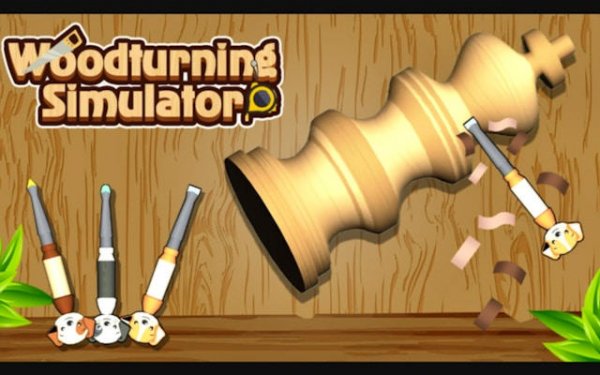
Wood Crafting Puzzle: 3D Simulator offers a unique blend of creativity and puzzle-solving. The realistic wood textures and gentle pace make it ideal for unwinding. Controls are intuitive on both touchscreens and mouse. With multiple patterns to master, it provides hours of satisfying, stress-free play. Great for all ages.
Wood Crafting Puzzle: 3D Simulator brings the art of wood shaping to your screen. You start with a simple block of wood and use virtual tools to carve it into a finished piece. The game provides a calm, focused environment where you can create bowls, vases, and sculptures. Each project follows a pattern that guides your cuts. This is not a fast-paced action game. It is a slow, methodical puzzle that rewards patience and precision. The 3D graphics make the wood grain and tool marks look realistic. You can rotate the piece to see your work from any angle. The game is suitable for anyone who enjoys creative puzzles or wants a relaxing activity.
To play Wood Crafting Puzzle: 3D Simulator, select a level to see the target shape. Use your mouse or touch input to control the carving tool. Move the tool along the spinning wood to remove material. Follow the pattern lines closely to shape the wood correctly. The game gives feedback on your progress. You can zoom in for detailed work. Each level has a time limit or a number of moves, but the pace is gentle. Complete the shape to unlock the next challenge. There are no penalties for mistakes, so you can learn at your own speed.
Realistic 3D wood carving simulation with detailed textures. Multiple patterns to master, from simple bowls to complex sculptures. Intuitive controls that work on touchscreens and with a mouse. Relaxing background music and sound effects of carving. Progress tracking with unlockable new projects. No ads during gameplay for uninterrupted focus. Suitable for all ages and skill levels.
Take your time and follow the pattern lines carefully. Use the zoom feature to work on detailed areas. Rotate the piece frequently to check your progress from all angles. Practice on simpler shapes before attempting complex sculptures. Enjoy the process and don't worry about mistakes—the game encourages learning at your own pace.





Comments
0 comments