Telling Time: Analog Clock Challenge

Telling Time: Analog Clock Challenge

Developer: Highway Veil Digital
Updated: 2026-07-21
| Puzzle , Learning , Children , Time-Telling , Clock , Education
Advertisement

Review

This game stands out for its patient, encouraging approach to a foundational skill. The interactive clock face is intuitive, and the gradual introduction of half-hours and minutes prevents overwhelm. Children can practice without time pressure, building real understanding. The cross-platform compatibility is a bonus for families. It is a focused, well-executed educational tool that respects a child's learning pace.

About This Game

Learning Through Interaction

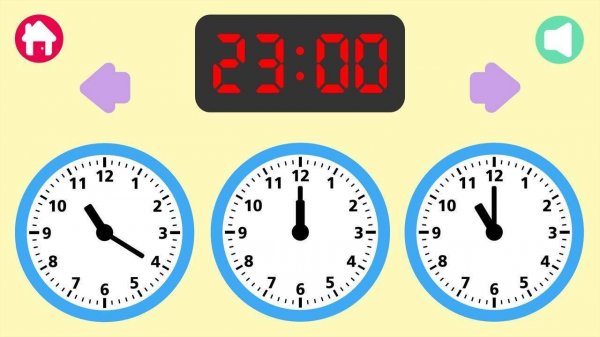
The core activity revolves around a digital clock face that responds to touch or mouse input. Children see a time displayed numerically and must adjust the hour and minute hands to match. This direct manipulation helps translate abstract time concepts into a tangible skill. The interface uses bright, friendly visuals that appeal to young audiences without being distracting. Each correct placement triggers a small reward animation, reinforcing the learning loop.

Progressive Difficulty

The game introduces time-telling in manageable steps. Early rounds focus on whole hours, allowing children to grasp the basic positions of the hour hand. As proficiency grows, half-hour and quarter-hour increments appear. Later challenges include five-minute intervals, gradually building up to precise minute reading. This structured approach prevents frustration while keeping the experience fresh. Players can repeat any level to solidify their understanding.

Encouraging Independence

There are no timers or scoring pressures, so children can explore at their own speed. The game provides clear visual cues when hands are placed correctly, and offers a simple retry option after mistakes. This design fosters a positive association with learning. Parents and teachers can observe progress without the child feeling evaluated. The environment feels more like a playful activity than a formal lesson.

Cross-Platform Accessibility

The game works on tablets, smartphones, and computers, making it easy to practice anywhere. Touch controls are optimized for small fingers, with large interactive areas on the clock face. The consistent experience across devices means children can switch between home and school use seamlessly. No internet connection is required after initial loading, ensuring reliable access in various settings.


Compatibility

๐Ÿ’ป Desktop | ๐Ÿ“ฑ Mobile | ๐Ÿ“Ÿ Tablet
โ€“ All supported ยท Best with Chrome or Safari

Faq

What age group is Telling Time: Analog Clock Challenge designed for?
The game is primarily aimed at children aged 4 to 8 who are beginning to learn how to read analog clocks. The simple interface and gradual difficulty curve make it accessible for preschoolers, while older kids can benefit from the more advanced minute-reading challenges.
Does the game include any in-app purchases or advertisements?
Based on the information provided, there are no mentions of in-app purchases or advertisements. The focus is purely on educational content, making it a safe choice for young learners without unexpected interruptions or costs.
Can multiple children use the same device with individual progress tracking?
The input does not specify multi-user profiles or progress tracking. Typically, games of this type may save progress locally on the device, but it is best to assume that each session starts fresh unless the game includes a save feature. Check the app settings for details.
Is there a timer or time limit that might stress children?
No, the game is designed without timers or time limits. Children can take as long as they need to set the clock hands correctly. This stress-free approach encourages exploration and repeated practice without pressure, which is ideal for building confidence.
What languages does the game support for instructions and interface?
The input does not specify language options. Many educational games of this type support multiple languages, but it is not confirmed. The visual nature of the game (matching numbers to clock hands) means it can be used effectively even without text instructions.
How does the game provide feedback when a child makes a mistake?
When a child sets the clock hands incorrectly, the game offers gentle visual cues and allows them to try again without any negative feedback. There are no penalties or error sounds. This positive reinforcement helps children learn from mistakes without feeling discouraged.

Comments

0 comments
U
User
Loading comments...